
You’ll need to follow a few simple steps to connect your Fitbit account to MyDataHelps if you want to view your data or if a study project requires you to connect your Fitbit account. This guide walks you through everything you need to get started.
What You’ll Need
- A wearable device to pair with Google Health (e.g., Fitbit)
- A Google Health account
- The MyDataHelps app installed on your phone or access to https://mydatahelps.org
Step 1: Make sure your device is set up
Before connecting to MyDataHelps, make sure your Google wearable device (e.g., Fitbit) is paired with your Google account in the Google Health app.
To check:
- Open the Google Health app on your phone.
- Tap your Connections icon in the top left corner.
- Make sure your device is listed and connected.
- If your device is not connected, follow the prompts in the Google Health app to set it up.
If you’ve used Google Health or Fitbit in the past or created more than one account, there may be multiple Google Health accounts. This can cause issues during connection. To learn how to check which account or device is currently connected, refer to our Troubleshooting Google Health Connection Issues article.
Step 2: Connect Google Health to MyDataHelps
Once your device is paired to your Google Health account, follow these steps to connect it to MyDataHelps:
- Open the MyDataHelps app.
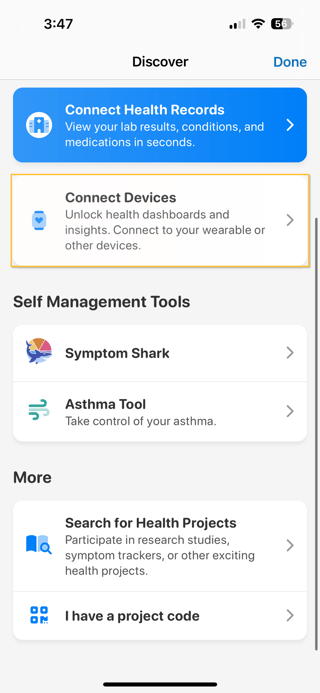
- Tap “Discover”.
- Tap “Connect Devices”.
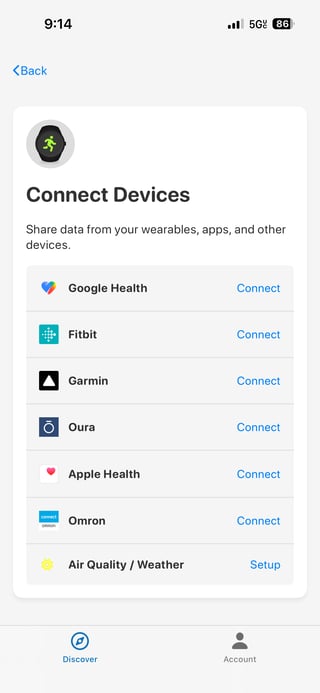
- Tap “Connect” next to Google Health.
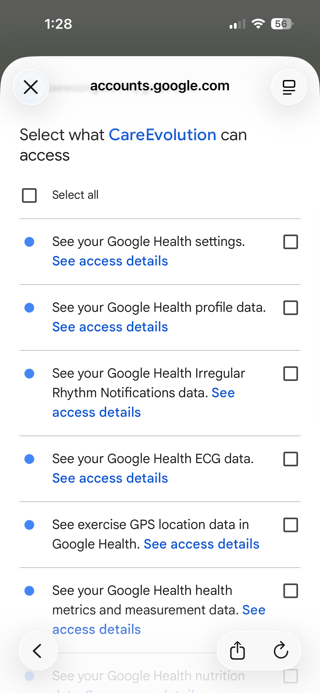
- When prompted, select which data points you would like to share with MyDataHelps.
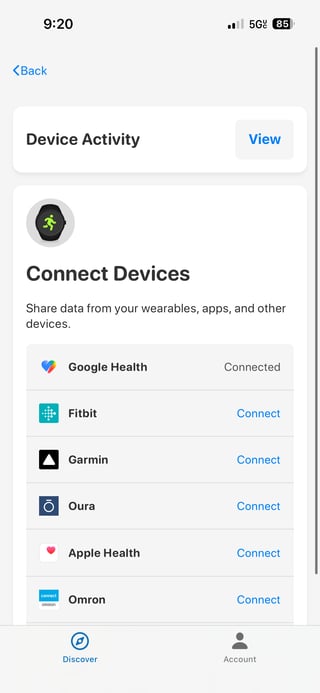
- After clicking “Continue”, you should see Connected next to Google Health meaning your setup is complete! Your data will now be sent automatically to MyDataHelps.
Sometimes, Google Health may lose connection with MyDataHelps if your connection expires or your account changes. If your data stops syncing or you're asked to reconnect, check out our Troubleshooting Google Health Connection Issues article for help.